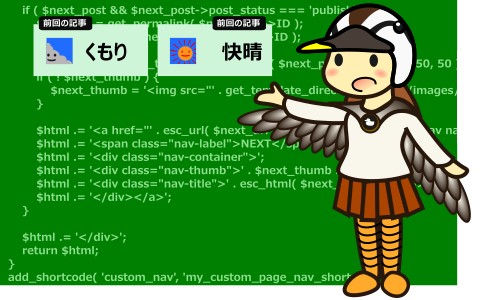
バージョン1:最初に作ったもの
ショートコード用コード
PHP
/**
 * Cocoonブログカード風 ページ送りナビゲーター
 * ショートコード [custom_nav] の登録
 */
function my_custom_page_nav_shortcode() {
    // 前後の記事の情報をWordPressから自動取得
    $prev_post = get_previous_post();
    $next_post = get_next_post();

    // どちらの記事も存在しない場合は何も表示しない
    if ( ! $prev_post && ! $next_post ) { return ''; }

    $html = '<div class="custom-page-nav-wrapper">';

    // --- 前の記事へ ---
    if ( $prev_post ) {
        $prev_url = get_permalink( $prev_post->ID );
        $prev_title = get_the_title( $prev_post->ID );

        // サムネイル画像(無ければCocoonのNO IMAGE画像を表示)
        $prev_thumb = get_the_post_thumbnail( $prev_post->ID, array( 50, 50 ) );
        if ( ! $prev_thumb ) {
            $prev_thumb = '<img src="' . get_template_directory_uri() . '/images/no-image.png" alt="No Image">';
        }

        $html .= '<a href="' . esc_url( $prev_url ) . '" class="custom-page-nav nav-prev">';
        $html .= '<span class="nav-label">PREV</span>';
        $html .= '<div class="nav-container">';
        $html .= '<div class="nav-thumb">' . $prev_thumb . '</div>';
        $html .= '<div class="nav-title">' . esc_html( $prev_title ) . '</div>';
        $html .= '</div></a>';
    }

    // --- 次の記事へ ---
    if ( $next_post ) {
        $next_url = get_permalink( $next_post->ID );
        $next_title = get_the_title( $next_post->ID );

        $next_thumb = get_the_post_thumbnail( $next_post->ID, array( 50, 50 ) );
        if ( ! $next_thumb ) {
            $next_thumb = '<img src="' . get_template_directory_uri() . '/images/no-image.png" alt="No Image">';
        }

        $html .= '<a href="' . esc_url( $next_url ) . '" class="custom-page-nav nav-next">';
        $html .= '<span class="nav-label">NEXT</span>';
        $html .= '<div class="nav-container">';
        $html .= '<div class="nav-thumb">' . $next_thumb . '</div>';
        $html .= '<div class="nav-title">' . esc_html( $next_title ) . '</div>';
        $html .= '</div></a>';
    }

    $html .= '</div>';
    return $html;
}
// [custom_nav] というショートコードをWordPressに登録
add_shortcode( 'custom_nav', 'my_custom_page_nav_shortcode' );
CSS
/* ===================================================
 * Cocoon「カラフルライン」専用 独自ページ送りボタン
 * =================================================== */

/* 2カラム用の外枠コンテナ */
.custom-page-nav-wrapper {
  display: flex;
  gap: 20px;
  margin: 30px 0;
  width: 100%;
}

/* ページ送りボタン全体の共通設定 */
.custom-page-nav {
  flex: 1;
  /* 片方だけになった場合でも、最大で横幅の半分に制限 */
  max-width: calc(50% - 10px);
  display: block;
  position: relative;
  border: 1px solid rgba(85, 85, 85, 0.15);
  border-radius: 6px;
  padding: 22px 15px 15px; /* ラベルの余白を考慮 */
  text-decoration: none !important;
  color: #333 !important;
  /* 【背景色】カラフルラインに合わせた爽やかなライトグリーン */
  background-color: rgba(220, 245, 222, 0.75);
  backdrop-filter: blur(2px);
  transition: all 0.3s ease;
}

/* マウスホバー時のエフェクト */
.custom-page-nav:hover {
  background-color: rgba(200, 240, 203, 0.95);
  border-color: #555555;
  box-shadow: 0 6px 12px rgba(0, 0, 0, 0.08);
  transform: translateY(-2px); /* フワッと少し浮き上がる演出 */
}

/* 一度クリックした(訪問済み)リンクの設定 */
.custom-page-nav:visited {
  background-color: rgba(235, 235, 235, 0.8) !important;
  border-color: rgba(85, 85, 85, 0.1) !important;
}

/* 訪問済みカードにマウスを乗せた時のエフェクト */
.custom-page-nav:visited:hover {
  background-color: rgba(220, 220, 220, 0.95) !important;
  border-color: #777777 !important;
}

/* ブログカード風ラベルの共通設定 */
.custom-page-nav .nav-label {
  position: absolute;
  top: -10px;
  font-size: 11px;
  font-weight: bold;
  color: #fff;
  padding: 3px 9px;
  border-radius: 4px;
  line-height: 1.2;
  letter-spacing: 0.05em;
  box-shadow: 0 2px 4px rgba(0,0,0,0.1);
  background-color: #555555;
}

/* PREV / NEXT の個別配置設定 */
.nav-prev .nav-label { left: 15px; }
.nav-next .nav-label { right: 15px; }

/* 「前の記事(PREV)」が非表示のとき、「次の記事(NEXT)」を右寄せにする */
.nav-next:first-child,
.nav-prev + .nav-next:last-child {
  margin-left: auto;
}

/* 内包要素のレイアウト(サムネイルとタイトルの並び) */
.nav-container {
  display: flex;
  align-items: center;
  gap: 12px;
}

/* サムネイル画像の縮小設定(正方形 50px) */
.custom-page-nav .nav-thumb {
  flex-shrink: 0;
  width: 50px;
  height: 50px;
}
.custom-page-nav .nav-thumb img {
  width: 100%;
  height: 100%;
  object-fit: cover;
  border-radius: 4px;
}

/* 記事タイトルと矢印 */
.custom-page-nav .nav-title {
  flex-grow: 1;
  font-size: 14px;
  font-weight: bold;
  line-height: 1.4;
  position: relative;
  overflow: hidden;
  text-overflow: ellipsis;
  display: -webkit-box;
  -webkit-line-clamp: 3; /* タイトルを最大3行まで表示 */
  -webkit-box-orient: vertical;
}

/* 矢印マーカーの共通カラー設定 */
.nav-prev .nav-title::before,
.nav-next .nav-title::after {
  color: #555555;
}

/* 前の記事へ(左矢印) */
.nav-prev .nav-title { padding-left: 18px; }
.nav-prev .nav-title::before {
  content: "?";
  position: absolute;
  left: 0;
  top: 50%;
  transform: translateY(-50%);
  font-size: 16px;
}

/* 次の記事へ(右矢印) */
.nav-next .nav-title { padding-right: 18px; text-align: right; }
.nav-next .nav-title::after {
  content: "?";
  position: absolute;
  right: 0;
  top: 50%;
  transform: translateY(-50%);
  font-size: 16px;
}

/* スマートフォン(画面幅768px以下)用のレスポンシブ設定 */
@media screen and (max-width: 768px) {
  .custom-page-nav-wrapper {
    flex-direction: column;
    gap: 15px;
  }
  .custom-page-nav {
    max-width: 100%;
    margin-left: 0 !important; /* スマホ時は右寄せを解除 */
  }
}
バージョン2:記事IDを指定できるように修正
ショートコード用コード
PHP
/**
 * 【改良版】記事IDを指定できるページ送りナビゲーター
 * ショートコード [custom_nav prev="前の記事ID" next="次の記事ID"]
 */
function my_custom_page_nav_shortcode( $atts ) {
    // ショートコードの引数(パラメータ)を受け取る設定
    $atts = shortcode_atts( array(
        'prev' => '', // 前の記事のID(省略時は自動取得)
        'next' => '', // 次の記事のID(省略時は自動取得)
    ), $atts, 'custom_nav' );

    // --- 前の記事の情報を取得 ---
    if ( ! empty( $atts['prev'] ) ) {
        // IDが指定されている場合は、その記事の情報を取得
        $prev_post = get_post( intval( $atts['prev'] ) );
    } else {
        // 指定がない場合は、これまで通り時系列の前の記事を自動取得
        $prev_post = get_previous_post();
    }

    // --- 次の記事の情報を取得 ---
    if ( ! empty( $atts['next'] ) ) {
        // IDが指定されている場合は、その記事の情報を取得
        $next_post = get_post( intval( $atts['next'] ) );
    } else {
        // 指定がない場合は、これまで通り時系列の次の記事を自動取得
        $next_post = get_next_post();
    }

    // どちらの記事も存在しない(取得できない)場合は何も表示しない
    if ( ! $prev_post && ! $next_post ) { return ''; }

    $html = '<div class="custom-page-nav-wrapper">';

    // --- 前の記事へ(PREV)の表示処理 ---
    if ( $prev_post && $prev_post->post_status === 'publish' ) {
        $prev_url = get_permalink( $prev_post->ID );
        $prev_title = get_the_title( $prev_post->ID );

        $prev_thumb = get_the_post_thumbnail( $prev_post->ID, array( 50, 50 ) );
        if ( ! $prev_thumb ) {
            $prev_thumb = '<img src="' . get_template_directory_uri() . '/images/no-image.png" alt="No Image">';
        }

        $html .= '<a href="' . esc_url( $prev_url ) . '" class="custom-page-nav nav-prev">';
        $html .= '<span class="nav-label">PREV</span>';
        $html .= '<div class="nav-container">';
        $html .= '<div class="nav-thumb">' . $prev_thumb . '</div>';
        $html .= '<div class="nav-title">' . esc_html( $prev_title ) . '</div>';
        $html .= '</div></a>';
    }

    // --- 次の記事へ(NEXT)の表示処理 ---
    if ( $next_post && $next_post->post_status === 'publish' ) {
        $next_url = get_permalink( $next_post->ID );
        $next_title = get_the_title( $next_post->ID );

        $next_thumb = get_the_post_thumbnail( $next_post->ID, array( 50, 50 ) );
        if ( ! $next_thumb ) {
            $next_thumb = '<img src="' . get_template_directory_uri() . '/images/no-image.png" alt="No Image">';
        }

        $html .= '<a href="' . esc_url( $next_url ) . '" class="custom-page-nav nav-next">';
        $html .= '<span class="nav-label">NEXT</span>';
        $html .= '<div class="nav-container">';
        $html .= '<div class="nav-thumb">' . $next_thumb . '</div>';
        $html .= '<div class="nav-title">' . esc_html( $next_title ) . '</div>';
        $html .= '</div></a>';
    }

    $html .= '</div>';
    return $html;
}
add_shortcode( 'custom_nav', 'my_custom_page_nav_shortcode' );
CSS
CSSはバージョン1のものをそのまま使用できます。
バージョン3:前の記事、あとの記事がない場合は空欄とする。
ショートコード用コード
PHP
/**
 * 【引数特化版】記事IDを完全コントロールできるページ送りナビゲーター
 * ショートコード [custom_nav prev="前の記事ID" next="次の記事ID"]
 */
function my_custom_page_nav_shortcode( $atts ) {
    // ショートコードの引数(パラメータ)を受け取る設定
    $atts = shortcode_atts( array(
        'prev' => '', // 前の記事のID
        'next' => '', // 次の記事のID
    ), $atts, 'custom_nav' );

    // 判定用フラグ:引数が「どちらも」完全に空っぽかどうか
    $no_arguments = empty( $atts['prev'] ) && empty( $atts['next'] );

    // --- 前の記事(PREV)の取得ロジック ---
    if ( ! empty( $atts['prev'] ) ) {
        // ① prevの指定があるなら、そのIDの記事だけを取得
        $prev_post = get_post( intval( $atts['prev'] ) );
    } elseif ( $no_arguments ) {
        // ② 引数が一切指定されていない時だけ、時系列の前の記事を自動取得
        $prev_post = get_previous_post();
    } else {
        // ③ nextだけが指定されている場合は、前の記事は「表示しない」
        $prev_post = null;
    }

    // --- 次の記事(NEXT)の取得ロジック ---
    if ( ! empty( $atts['next'] ) ) {
        // ① nextの指定があるなら、そのIDの記事だけを取得
        $next_post = get_post( intval( $atts['next'] ) );
    } elseif ( $no_arguments ) {
        // ② 引数が一切指定されていない時だけ、時系列の次の記事を自動取得
        $next_post = get_next_post();
    } else {
        // ③ prevだけが指定されている場合は、次の記事は「表示しない」
        $next_post = null;
    }

    // どちらの記事も存在しない場合は何も表示しない
    if ( ! $prev_post && ! $next_post ) { return ''; }

    $html = '<div class="custom-page-nav-wrapper">';

    // --- 前の記事へ(PREV)の表示処理 ---
    if ( $prev_post && $prev_post->post_status === 'publish' ) {
        $prev_url = get_permalink( $prev_post->ID );
        $prev_title = get_the_title( $prev_post->ID );

        $prev_thumb = get_the_post_thumbnail( $prev_post->ID, array( 50, 50 ) );
        if ( ! $prev_thumb ) {
            $prev_thumb = '<img src="' . get_template_directory_uri() . '/images/no-image.png" alt="No Image">';
        }

        $html .= '<a href="' . esc_url( $prev_url ) . '" class="custom-page-nav nav-prev">';
        $html .= '<span class="nav-label">PREV</span>';
        $html .= '<div class="nav-container">';
        $html .= '<div class="nav-thumb">' . $prev_thumb . '</div>';
        $html .= '<div class="nav-title">' . esc_html( $prev_title ) . '</div>';
        $html .= '</div></a>';
    }

    // --- 次の記事へ(NEXT)の表示処理 ---
    if ( $next_post && $next_post->post_status === 'publish' ) {
        $next_url = get_permalink( $next_post->ID );
        $next_title = get_the_title( $next_post->ID );

        $next_thumb = get_the_post_thumbnail( $next_post->ID, array( 50, 50 ) );
        if ( ! $next_thumb ) {
            $next_thumb = '<img src="' . get_template_directory_uri() . '/images/no-image.png" alt="No Image">';
        }

        $html .= '<a href="' . esc_url( $next_url ) . '" class="custom-page-nav nav-next">';
        $html .= '<span class="nav-label">NEXT</span>';
        $html .= '<div class="nav-container">';
        $html .= '<div class="nav-thumb">' . $next_thumb . '</div>';
        $html .= '<div class="nav-title">' . esc_html( $next_title ) . '</div>';
        $html .= '</div></a>';
    }

    $html .= '</div>';
    return $html;
}
add_shortcode( 'custom_nav', 'my_custom_page_nav_shortcode' );
CSS
CSSはバージョン1のものをそのまま使用できます。
動作確認
動作環境
ブログ「くもり のち 快晴」と「やすりとのり」で動作確認を行いました。動作環境は以下です。
- レンタルサーバー:ConoHaWing
- WordPressのバージョン:7.0-ja
- テーマ:Cocoon Child バージョン 1.1.2
- スキン:カラフルライン
「くもり のち 快晴」と「やすりとのり」では問題は発生しませんでしたが、それ以外の環境では動作確認を行っていません。動作を試す場合は各自の責任で実施してください。
試し方
以下の手順で「ページ送りナビゲーター」をWordPressの記事に配置してください。
- WordPressの管理画面から「外観」→「テーマファイルエディター」をクリックする。
- 画面右側の「テーマファイル」欄で「functions.php」をクリックする。
- PHPのソースコードをコピーしてテーマファイルエディタ―の編集欄にペーストする。
- 「ファイルを更新」ボタンをクリックして保存する。
- WordPressの管理画面から「外観」→「カスタマイズ」をクリックする。
- 「追加CSS」をクリックする。
- CSSのソースコードをコピーして追加CSSの編集欄にペーストする。
- 画面左上の「公開」ボタンをクリックする。
- ブログの記事内にショートコードを呼び出すための命令を記述する。
- 記事を公開、または下書保存する。
- プレビューを表示する。
上記手順9のショートコードを呼び出すための命令は以下のように記述してください。
バージョン1
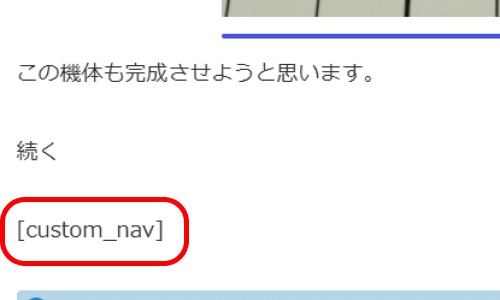
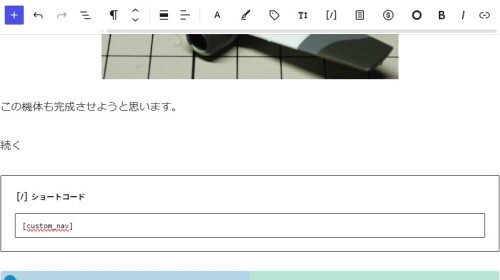
下に示すように、「custom_nav」という呼出し命令を角括弧で囲ったものを記述してください。
段落に直接記述する場合
ショートコードブロックを利用する場合
バージョン2および3
バージョン1と同じ動作をさせる場合はバージョン1と同様に記述してください。
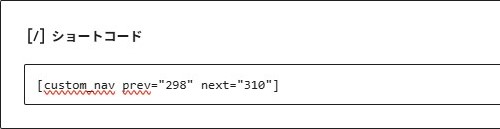
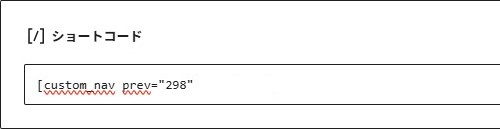
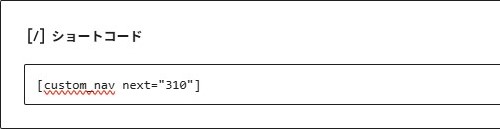
前のページ、次のページを両方指定する場合は、「custom_nav」の後ろにスペースを挟んで「prev=”前の記事の記事ID”」と「next =”次の記事の記事ID”」を記述してください。
例えば前の記事の記事IDが298、次の記事の記事IDが310の場合は、以下のように記述してください。
前の記事のみ指定する場合は、「custom_nav」の後ろにスペースを挟んで「prev=”前の記事の記事ID”」のみを記述してください。
次の記事のみ指定する場合は、「custom_nav」の後ろにスペースを挟んで「next=”次の記事の記事ID”」のみを記述してください。
PHPのプログラムは各バージョンに応じたものを使用してください。CSSはどのバージョンでもバージョン1に掲載したものを使用してください。
また、テーマファイルエディターでは、必ず「functions.php」を指定してからソースをコピーしてください。
「functions.php」を編集する場合、元々あったものを削除してしまうと、ブログが正しく表示されなくなってしまいます。絶対に削除しないように注意して操作してください。
コメント